Showing posts with label minimalizm. Show all posts

Friday, July 24, 2009

How to deal with big GWT applications

Well, this is a bit of personal experience.
Instead of making extra-large GWT app having all the functions at one place I would use 'mixed' approach.

'Mixed' means that we install different app features on different pages (yes, user would need to change page from time to time) and exchange data through server session storage.

This would give us several good points:
  1. Page is (oftenly) refreshed, thus freeing memory :)
  2. Not that much code to load/execute
  3. Ability to make more clean code (not so much intermodule communications)
  4. More structured and less complex code (no 'overhead for common'). That's the main, I believe.
  5. Ease of content rendering.
Bad things:
  1. It's not that sleek and smooth.
  2. Lots of requests to server. Additional files loaded (.cache, .nocache, all dependenices all the time. it's cached, yes, but anyway...)
  3. Weird compilation. Having 7 gwt compilations is even worthe than 1, I think. Though, can be well-automated with ant.
  4. Can not use anymore stateless server (so, not that easy clustering/performance scaling)

It's something that can be considered as 'good practice', and 'personal opinion'.
If I were starting large GWT project now, I'd design it as described here.

Btw, take a look at LinkedIn. :)

Friday, June 19, 2009

Learning python

I think I like Python very much...

I spent several days reading book about 2hrs a day, and wrote small script which reads database, prepares report, generates html content and sends this content as an email message (both html and text version, for old/specific clients).

The script is scheduled with the CRON and it just worked. So, i think this is really good result for the language you don't know.
  1. understand execution model
  2. incorporate database querying support (with named parameters, yeah :)
  3. understand how to generate html (I'm using jaxml module, it's kinda cool. creating html document just looks like doc.html().body(color="red").p(string, align="center") )
  4. understand how to send e-mail message (yes, mime knowledge gives good help, but neretheless. I'm sending this through GMAIL - so, SSL support is also here)
  5. understand how to work with dates (that's a bit ugly now, I'm sure there's better way of obtaining today timestamp than time.mktime(datetime.date.today().timetuple()) )
All this, resulting in a working solution, took for me about 6-7 hrs from the start. Without language knowledge at all :) : )

Learn python!

Monday, April 27, 2009

Good practices vs Bad practices

If you are software developer, or designer, or photographer, or engineer, &c, you may have heard following:
– there are good practices and bad practices, and you should always - i said ALWAYS - use good practices.
That's wrong. You should use good practices in 90% only. Not more. And also you should apply your head when deciding if to use that cool design pattern in this place.

Have a look around, and you'll find tons of the examples.
  • You may have heard of database normalization. Basically, this is the way of developing DB schema powered by straight mathematic researches form relation theory. Idea is that if you follow that theory you'll never get data inconsistency. Opposed to this, there is denormalization, which is used 10 times more rarely than normalization, but brings beatiful performance shifts.
  • Rule of thirds in photography - split the frame into 9 common parts and situate the object in the crosses of the splitting lines. You'll concentrate viewers' attention on the object.
    - yes, that's true. And now go to any more or less interesting photo museum, and look how frames are organized. Basically, this is the second level of harmony ;)
  • You know - you should never use magic numbers. NEEEEVER! If i see something in your css code saying offsetWidth = (width - 16) + "px" I would not be happy with that.
    But nature owns all of us :) Following picture describes that very well.
    Explanation:
  • Google uses different stylesheets for different browsers.
  • Internet explorer handles 100% widths awfully. If you embed some element with paddings and margins into other element, it will take more than 100%, because IE does not use padding and margin values when calculating 100%
  • Width of the scrollbar in IE is 17px
  • There is a way of doing correct 100% width with IE. It utilizes IE css "expression" facility, and recalculates the width on each page event (even mouse move). This would be canonical way.
  • Although, Google decided to use -17px right margin just to stop loosing performance. It's easier, and better for both user and developer.
Don't you think it is beautiful?


P.S. There's no attempt to reverse-engineer Google code - just attempt to learn how big guys work. No IP violated :) Google is a registered trademark of Google Inc.

Thursday, April 23, 2009

Typetester - a little free service form choosing a font

So, you need to select a font for your
  • Blog
  • Site
  • Publication
  • Page on the web
  • ...
Or even worse - you have done that work partially, but now (after 2 month) you want to restore the work. And you just can't figure out what font you've used before :)

If you are not professional in printing, I don't really think you'll be able to notice difference between Bitstream Vera Sans and Sans.

So - typester is a solution for selecting correct font.

Hope this will be useful.

Wednesday, March 25, 2009

Google Alerts: watch the web growing

Google has very cool service, which is now that widely used as mail, or docs...
It is Google alerts. Basically, idea is very simple - you just get to their website and enter keywords you want to get notified about.

Once Google bot indexes page, which may be relevant to the search query you've provided - you get an e-mail message about that. Some kind of 'Google bot news' :)

You can tune the service to send you updates on each encounter of relevant page, or pack these pages to daily/weekly digest.

This things becomes very useful, when you watch some activity on the web - for example, your partner's website.

Google Alerts is an example of minimalistic interfaces (as for me), and that's why it has this tag granted :).

Tuesday, March 24, 2009

Different TRAC workflow for individual ticket types

TRAC is a tracking software, used to store and work with different issues during software development process - let it be bugs, development tasks, requirements, or feature requests.
It is free, flexible, has good SVN integration (as for me), and is quite minimalistic in its design.

And - yes it heavily uses wiki markup everywhere, making all linkable to all.
But - if you want to setup custom workflow, and you want it to be different for different ticket types, you'll hit a wall. This is currently not implemented in trac workflow.

The good news are that TRAC is python-based, and thus its sources can be changed easily.

Different workflows for different ticket types in TRAC (TRAC ticket link:) ) describes how one can solve the problem, with minor application of patch command. Have not tried it yet, but will report soon...

Monday, March 16, 2009

Example of the job done with GWT

Just found out site I've been developing some time ago.
It's done with pure gwt, when I was completing it, it seemed to me veery cool.

For english-speaking guys: sorry for cyrillic :)

So, here's link: Металлопластиковые окна в Херсоне: ТМ Основа

It is very easy. It incorporates usage of the GWT history support (try clicking back button) , and it has some heavy-duty stuff done with GWT and modified Canvas widget from GWT widget library.

To see it, you can go to Посчитай!->Выбрать тип конструкции.

The wireframe pictures of the window shapes are drawn here, on the client! For Opera/Safari/Mozilla element is used, and for the IE6/7 - VML. Looks good, isn't it?

Sunday, February 8, 2009

Awesome

Awesome
Awesome is not just an exclamation - it is a name for perfect window manager utilizing tiling windows concept. It can be used for X windows systems on the *nix and BSD systems. I'm using it now, and I would like to share awesome experience.

Background
The idea of multiple windows shown at the same time on the single screen is known for times. Curses, TurboVision creates interfaces capable of showing pseudo-windows with ASCII characters. Bunch of software called terminal multiplexers (see Terminal Multiplexers on Wikipedia) is used for showing several text program outputs on the same text terminal. The best use case I can see is tailing several log files to monitor distributed activity in runtime. Or I can run some commands in the active console, and watch their output (which goes to file :) ) on other virtual terminal.

Nowadays people mostly use graphical user interface. In the Unixes X Window system makes all the low-level work on rendering data and basic manipulating windows. In the Redmond-like GUIs we got used to window decoration, overlapping windows, task bar showing tasks being executed, ability to drag and resize windows with mouse. All this stuff in the Unix world is done by Window Manager (WM). There are different WM's doing their job in different way.

You might have noticed monitor aspect ratio change trend. Monitors are going wider. Resolution goes higher. Have you ever tried maximizing any file manager on the 1920x1200 resolution? One may feel uncomfortable and lost in such a wide space with lots of icons. There is not that much tasks that really require that much information shown on-screen simultaneously. On the other side, if you open lots of windows to utilize informational space, you can run into problems with finding appropriate one.

Tiling window managers
The descendants of the terminal multiplexers are tiling window managers. General idea is to split the screen into non-overlapping areas, and put each window into appropriate area. With this concept, you can see all the information at the same time. And you don't need press Alt+Tab all the time :).
Tiling concept is extended with various features, such as different focus models, static or dynamic window arrangement, virtual desktops/tags, tabs to arrange windows in the single slot, and much, much more.
I am using Awesome window manager.

Awesome features
  • Dynamic layout model. When new window gets opened you do not need to position it somewhere manually. Awesome decides where to put it based on the windows role, current configuration and layout.
  • Full keyboard control. You can do everything with keyboard. Move focus forward/backward, switch layouts, rearrange windows, change cell size, etc...
  • Full mouse control. In addition to keyboard, you can do all the stuff mentioned above with your mouse. It is very handy when working with graphic editors, for example.
  • Tags. You might have heard of virtual desktops - concept, used heavily in Unix desktop environments. Tags are different. Instead of setting single virtual desktop for window you can assign several tags to it, and window will be shown in each of these tags. This feature allows you to show some important windows on all the tags (so they are visible all the time)
  • Layout models. Awesome allows to assign different layouts for tags. Windows can be arranged vertically, horizontally, full-screen, maximized, centered (active window is in center of screen, all other are in background tiled vertically), spiral, flying. The least one is the layout all of us got used to - overlapping windows. Yes, for some tasks it is very handy.
  • Performance. Awesome does no windows decoration. No borders, no headers. Awesome uses XCB - the fastest way of talking to X server by now. Size of the program is 8 MB. Even when I do full compilation of my project, and both kernels are fully loaded, I can manage windows normally.
  • Programmability. Awesome itself is written in C, but all less important features (menu, key bindings, tag switcher, task bar, tray icon, clock, etc...) are written in Lua - scripting language. You can easily change anything you want. This does not even require recompilation.
Screenshots
Here are some screenshots made on my workstation.
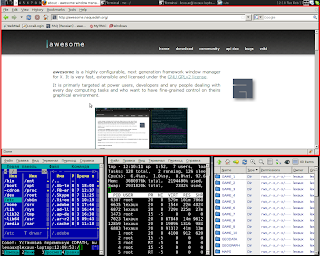
1. Vertical layout. Red border across top window (FireFox) indicates focus. Top line is the task bar. Small icon is the menu icon, 1-9 are tags. Taskbar is long, and spans across all free space. Clock is the widget i wrote myself in Lua. The lease element is the system tray having Skype and Pidgin icon.
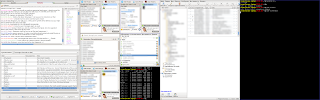
2. Dual-monitor setup. The left screen has several IM windows with horizontal tag layout, the right part has Thunderbird and terminal opened. Two monitors are my laptop primary screen (15" 1680x1050) and external Dell monitor (24" 1680x1050). The Awesome setup shown here is outdated for me.
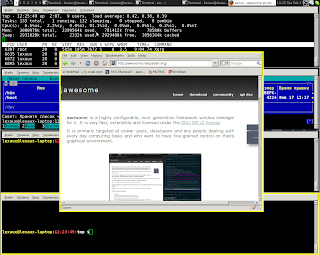
3. Current layout in centered mode. One window is in center, but allows seeing other. Yellow border is a mark border. You can perform single operation to several marked windows. So, window group operations are supported in Awesome, too.
Hope this posting may help someone find own way :) at least in computer interfaces.

Wednesday, December 10, 2008

MInimalizm

First of all, sorry for showing plain thoughts, without specific technical background.
I have found, that I like minimal things. I like:

1. Ipod shuffle 2nd generation - it does not have screen. It has only the blinking led. It has only one hole through which it gets charged, filled with data and into which your favourite headphones fit flawlessly.
2. TRAC. Yes, this is an abbreviation. http://trac.edgewall.org/ This is a tracking software (for bugs, change requests, some planning, for vivd documentation and for having all this stuff interlinked well. THis really works hard.
3. Awesome window manager. http://awesome.naquadah.org/ THis drives me crazy. Perfect thing for professional works with computer. It is tiling window manager, it does not have nor window headers neither borders, windows don't get overlapped normally, all is powered with keyboard. Result: you don't spend time on working with windows - dragging, resizing, etc.. You just spend time on working.

I hope to explain more of this stuff in the future posts, but tendency is prominent.
Things take your time. You need some things. So, you need things which take minimal amount of your time - MINIMAL ones.